

What do Jira admins need to do before Atlassian's December 3 usage billing?
Check your Rovo credit and Automation step usage in Atlassian Administration, compare it with your pooled monthly allowance, and decide whether to allow pay as you go or set a spending cap. Then list the automations your team can't lose. From December 3, usage above your allowance is billed, or paused if pay as you go is off.
- Two meters, two pools. Rovo credits and Automation steps each have a monthly allowance shared across your organization.
- Check pay as you go on each meter. On, usage over the allowance is billed. Off, Rovo features pause and automation flows stop.
- Rank your rules. Know which automations your team can't lose before a limit decides for you.
From December 3, 2026, Atlassian bills the usage above your included monthly allowance of Rovo credits and Automation steps. If your organization stays inside the allowance, you pay nothing extra. If it doesn't, one setting decides whether work keeps running, costs extra or stops, and an admin should choose that setting on purpose.
This guide walks through the checklist in five steps. First, what changes for Rovo credits and Jira automation limits. Then how to baseline usage, what your overage policy should be, which workflows draw on both meters, and which automations your team can't lose. Planning a move from Data Center? Our guide to Data Center end-of-life and Marketplace apps covers the app side; these two meters belong in your Cloud cost model too.
What Changes on December 3 for Rovo Credits and Jira Automation Limits?
On December 3, 2026, Atlassian starts billing Rovo credits and Automation steps used beyond your plan's monthly allowance. Allowances are pooled across your organization and refresh on your usage billing date. List prices for extra usage are $0.01 per credit and $0.50 per 1,000 steps. With pay as you go off, usage stops at the allowance.
A Rovo credit is Atlassian's unit for measuring AI usage and enriched Teamwork Graph context in Jira and Confluence. An Automation step is one executed trigger, condition, action, branch or loop in an automation flow. Each paid plan includes a monthly allowance of both, pooled across your organization. From December 3, 2026, usage beyond the allowance is billed as extra usage (pay as you go) or paused.
Atlassian usage-based pricing treats Rovo credits and Automation steps as separate meters. Atlassian's docs use pay as you go and extra usage for the same thing: billing for usage above the allowance. We use pay as you go, and the admin screens say extra usage.
Three details are easy to miss. First, allowances are pooled: Atlassian adds up the allowance from every eligible subscription in your organization, so Jira and Confluence seats feed the same Rovo credit allowance. Second, allowances refresh on your usage billing date, not on the first of the month, and unused Rovo credits don't roll over. Third, not every AI feature costs credits. Rovo Search in Atlassian apps, definitions and summaries are free, a Rovo Chat Quick answers message costs 10 credits, and heavier work such as Think Deeper or agents in Jira uses a variable number. Atlassian's documentation on Rovo usage limits, How Rovo credits work, and its page How is your automation usage calculated list every category and step type.
How Do You Baseline Your Current Rovo Credit and Automation Step Usage?
Open Atlassian Administration, go to Usage, then Meters, and read the allowance and usage for Rovo credits and Automation steps. Export the Rovo credit CSV for detail by feature, user and agent. Then open Global automation, Usage, in Jira to see which flows use the most steps. Write both numbers down before December 3.
- Open Usage, then Meters. Go to admin.atlassian.com/meters as an organization admin and select your organization if you have more than one. The Atlassian Administration usage meters show allowance, usage and a forecast for each meter.
- Compare allowance with usage for each meter. Your Rovo credit allowance is seats times the per-user figure, added across apps. Atlassian's example: 100 Confluence Premium users and 100 Jira Premium users give (100 x 70) + (100 x 70) = 14,000 credits a month. For steps, 100 Jira Premium users and 100 Confluence Standard users give 75,000 + 10,000 = 85,000 steps.
- Export the Rovo credit data. Select Rovo credits, then Export data. Atlassian emails a CSV link that expires after 24 hours. The file covers up to 3 months or the first 1 million usage events and lists feature, user, agent, timestamp and credits.
- Find your busiest flows. In Jira, go to Settings, System, Global automation, then Usage. In Confluence, open Settings, then Automation under Admin tools, then Usage. Select a flow to open its audit log and see how many Jira automation steps each run used.
- Write down two numbers per meter: usage as a share of the allowance, and your five biggest consumers. Atlassian notifies organization and billing admins at 80% and 100% of the allowance, so check that those mailboxes are watched.
What Should Your Overage Policy Be: Pay as You Go, a Spending Cap or a Usage Pack?
Choose the policy before December 3, because an unchecked setting will choose it for you. Pay as you go keeps work running and bills the excess. A spending cap does the same up to a limit you set. Turning pay as you go off pauses Rovo features and stops automation flows at the allowance. Usage packs add prepaid capacity.
Atlassian's own documentation says pay as you go is on by default. Check the setting on each meter in Atlassian Administration anyway, in case an admin changed it.
To set a limit, go to Billing and subscriptions, select the meter, then select Update extra usage limit and use the slider or enter a value. To turn it off, open the dropdown next to that button and select Disable extra usage. Both are covered in Manage extra usage for a meter.
- A limit set below the extra usage you've already incurred blocks metered features until usage resets.
- Disabling extra usage doesn't cancel what you've already used. It is still billed on your next invoice.
- Name one owner for each meter, a limit or an on-purpose off, and a monthly review date.
Which Workflows Hit Both Meters, and How Do You Forecast Them?
A rule draws on both meters when it mixes standard steps with an AI action. Use Rovo, Use agent and Use Jira Coding agent consume Rovo credits instead of steps, and every other trigger, condition, action, branch or loop in the rule still counts as a step. Forecast steps per run plus credits per run, times runs per month.
Atlassian's own example shows how both meters meet in one rule: a trigger (1 step), a condition (1 step), a Use Rovo action (Rovo credits, not steps) and an Add comment action (1 step). That is three Automation steps plus Rovo credits for the AI operation. Atlassian lists basic agents at 10 credits per billable event and advanced agents at a variable cost, so read the credits your own agents use from the Rovo usage export instead of estimating them.
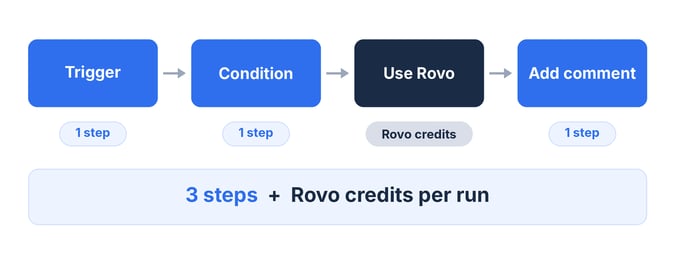
One rule can draw on both meters: three steps, plus Rovo credits for the AI action.
Four things move the step count, and you control all of them:
- Put the condition inside the trigger. A trigger set to "work item transitioned to Done" is one step. The same check as a separate condition is two.
- Watch loops. A loop counts once, plus the steps inside it for each item. A loop that updates three subtasks with one action each uses four steps.
- Retire rules that fail. Steps that ran before an error or failure still count. Runs that perform no actions no longer count, as of early November 2026.
- Check third-party AI actions. Use Cursor and Use GitHub Copilot count as automation steps, while Use Rovo, Use agent and Use Jira Coding agent draw credits.
To forecast, take your five busiest rules from the Usage view, read steps per run from the audit log, and multiply by monthly runs. Drafting a stakeholder update with the Jira Delivery Agent in Rovo Chat uses credits too, because each chat message and each agent invocation is a billable event. Agents you build into automations are metered. Agents nobody approved are a separate problem, covered in our shadow AI agents governance checklist.
Not sure how ready your Jira data is for AI? It takes 15 minutes.
Which Automations Can Your Agile Team Not Afford to Lose?
Start with the rules that move sprint work: sprint start and close, release updates and retro follow-up. If pay as you go is off and you reach your allowance, automation flows stop until usage resets. List each rule, what breaks without it and who notices first, then protect the top of that list before anything else.
Rank each rule on four questions:
- What breaks if it stops? A sprint-close rule that moves unfinished work fails silently. A release rule fails where people see it.
- Who notices first, and how fast? A rule nobody watches can fail for a sprint before anyone asks.
- How many steps does one run use, and how often does it run? A daily scheduled rule runs about 30 times a month.
- Does it call an AI action? If so, it also draws Rovo credits and sits on both meters.
Then protect the top of the list. Keep pay as you go on, or set a limit high enough to cover those rules, until your baseline tells you otherwise. Fix the rules that fail, because their steps count.
Retro follow-up is easy to leave off the list. With Agile Retrospectives for Jira, action items become Jira work items in a few clicks, and each work item's description links back to the retro session and the topic group it came from. A rule you write around those work items, such as a reminder when one is still open after a sprint, counts steps like any other rule, so it belongs on your protect list. You can try Agile Retrospectives for Jira free on the Atlassian Marketplace.
Set the Policy Before December 3, Not After the First Invoice
Five things to finish before December 3:
- Baseline both meters in Usage, then Meters, and export the Rovo credit data.
- Check the pay as you go setting on each meter.
- Set a limit, or turn it off on purpose, and name an owner.
- Count steps and credits for your busiest rules.
- Rank the automations you can't lose and protect them first.
Atlassian's allowances become limits on December 3. Whether a limit turns into an invoice line, a pause or a non-event is a decision, and it belongs to an admin, not to a default.
Frequently Asked Questions
What Changes on December 3 for Rovo Credits and Jira Automation Limits?
From December 3, 2026, Atlassian bills Rovo credits and Automation steps used beyond your organization's monthly allowance. Extra credits list at $0.01 each and extra steps at $0.50 per 1,000, at the time of writing. If pay as you go is off, Rovo features pause and automation flows stop until usage resets on your billing date.
How Do You Baseline Your Current Rovo Credit and Automation Step Usage?
In Atlassian Administration, open Usage, then Meters, and compare the allowance with usage for Rovo credits and Automation steps. Export the Rovo credit CSV for detail by feature, user and agent, then open Global automation, Usage, in Jira to see which flows use the most steps. Record both numbers before December 3.
What Should Your Overage Policy Be: Pay as You Go, a Spending Cap or a Usage Pack?
Choose between pay as you go with no cap, pay as you go with a monthly spending cap, pay as you go off, or a prepaid usage pack. Pay as you go keeps work running and bills the excess, and a cap limits that spend. Off pauses metered features at the allowance. Name an owner and a review date for whichever you choose.
Which Workflows Hit Both Meters, and How Do You Forecast Them?
A rule draws on both meters when it mixes standard steps with an AI action. Use Rovo, Use agent and Use Jira Coding agent consume Rovo credits, and every other trigger, condition, action, branch or loop in the rule counts as an automation step. Forecast steps per run and credits per run, then multiply by runs per month.
Which Automations Can Your Agile Team Not Afford to Lose?
Rank the rules that move sprint work: sprint start and close, release updates and retro follow-up. For each one, note what breaks if it stops, who notices first and how many steps it uses per run. If pay as you go is off and you reach your allowance, flows stop until usage resets, so protect the top of the list first.
Before Rovo bills by the credit, see how ready your Jira data is for AI. The audit takes 15 minutes.