

How do you use Jira AI to summarize sprint performance for stakeholders?
Use the Jira Delivery Agent (Rovo), on a schedule or in Rovo Chat, to draft the summary from your sprint report: give it the sprint goal, what finished, what carried over and why, and the open blockers. Then check the numbers against the Sprint Report, add the reason behind any miss, and end with one decision you need from stakeholders.
- AI drafts the what. The team adds the why.
- Check every number against the Sprint Report before you send.
- End with one decision you need, not a list of tickets.
Every sprint ends with the same question from someone outside the team: how did it go? Someone opens the Jira sprint report, copies the completed work items into a message, tries to explain the ones that slipped, and sends an update most people skim. Two weeks later, they do it again.
Jira can now write the first draft. Since July 2026, Atlassian's Jira Delivery Agent can turn a sprint's work items into a stakeholder update and post it on a schedule. This guide covers how to set it up, what to give it from your sprint report, what to check before you send, and a short template that keeps the team's explanation on top of the numbers.
How Can Jira's AI Summarize Sprint Performance for Stakeholders?
Jira's AI can draft a sprint summary three ways: a scheduled Stakeholder Status Summary automation in your space's Summary view, a prompt to the Jira Delivery Agent in Rovo Chat, or the Analyze button on a sprint insight. All three read your Jira work items. None of them knows why the sprint went the way it did unless someone wrote it down in Jira.
An AI sprint summary is a short, written update that Jira's AI drafts from a sprint's work items: goal result, completed and carried-over work, themes and risks. It reports what happened. The team still adds why it happened and what it needs from stakeholders, usually before a sprint review.
The Stakeholder Status Summary automation
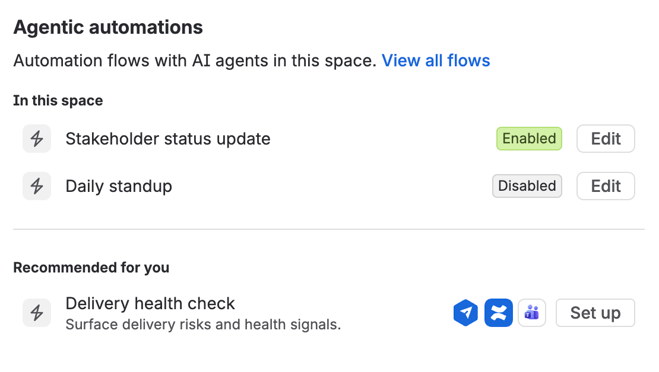
In July 2026, Atlassian introduced the Jira Delivery Agent, a built-in AI agent powered by Rovo, with three automation templates in a Jira space's Summary view: Daily Standup, Delivery Health Check and Stakeholder Status Summary. The last one collects progress, completed work, themes and risks into an update for Confluence or Slack. You pick where it goes and when it runs, and it posts on that schedule.
To set it up, open the Summary view of your space, find the automations section, select Stakeholder Status Summary (it appears as "Stakeholder status update" in our space) and follow the prompts. Atlassian lists three requirements: Confluence on your site, Rovo turned on, and the Delivery Agent, which comes with Jira and needs no installation. Setup is per space for now, and posting to Slack needs a Slack app or webhook.
Ask the Delivery Agent in Rovo Chat
If you'd rather write the update on demand, open Rovo Chat and pick the Jira Delivery Agent. One of its built-in conversation starters is "write me a status update for stakeholders", and Atlassian's documentation notes that prompts work better when you include the space key. You can also ask for a different audience, such as a short team summary or a higher-level update for executives.
Analyze a sprint insight
On your board or backlog, open the Insights panel, pick an insight such as Sprint commitment, and select Analyze. That opens the Delivery Agent with a summary of the data and suggested next steps. It's useful for checking a sprint mid-way, before you write the end-of-sprint update.
Two practical notes. Not every site has the Summary-view templates yet, so check yours before you plan around them. And the AI has a cost: Atlassian's Rovo credits page lists embedded summaries as free, but each Rovo Chat message and each agent run uses Rovo credits from your plan's allowance, with extra-usage billing starting December 3, 2026. If you already use Jira's AI at the other end of the sprint, see using Jira's AI for sprint planning.
What Should You Feed the AI from Your Jira Sprint Report?
The Jira sprint report already holds the numbers: what was completed, what wasn't, and what changed after the sprint started. What the AI can't find there is the context around those numbers. Give it four things in Jira before you ask for a summary: a written sprint goal, current statuses, flagged blockers with a comment, and a reason on every carried-over item.
Treat Atlassian's Sprint Report as the source of truth for counts. One detail to know before you compare: estimates on subtasks aren't included in the report, only estimates on parent work items.
The four inputs:
- A sprint goal written on the sprint. If the goal only lives in someone's head or a planning-meeting slide, the summary can list work but can't say whether the sprint succeeded. One sentence on the sprint itself is enough.
- Statuses that are current when the sprint closes. A work item that's finished but still says In Progress will be reported as carried over. Ask the team to update statuses before the sprint closes, not after the summary goes out.
- Blockers flagged, with a comment. A flag tells the AI something was blocked. A one-line comment says what was blocking it and who the team is waiting for, which is what stakeholders want to know.
- A reason on each carried-over item. "Waiting on the Platform team's API" or "split, half done" in a comment turns a list of unfinished work into something a stakeholder can act on.
Then ask for exactly the update you want. A prompt you can adapt for Rovo Chat:
Write a stakeholder status update for the sprint "[sprint name]" in space [KEY]. Audience: [product and engineering leadership]. Start with whether we met the sprint goal. List the outcomes we delivered in plain language, not work item titles. List work carried over to the next sprint with the reason recorded on each item. Name open blockers and who they depend on. Keep it under 200 words and leave out velocity and story points.
The AI can only summarize what's in Jira. If your work items are one-line titles with no descriptions, the summary will be a list of one-line titles. The same habits that make a backlog ready for AI agents, covered in backlog refinement for AI agents, make sprint summaries worth reading. To see where your Jira data stands, you can get your Jira data ready for Rovo with our free audit.
What Should You Check Before the Summary Goes to Stakeholders?
Check three things before you send an AI-drafted sprint summary: that its numbers match the Sprint Report, that decisions made outside Jira are included, and that any missed goal comes with a reason a person wrote. Atlassian itself recommends reviewing the Delivery Agent's summaries. A draft that reads well can still be wrong.
1. The numbers match the Sprint Report
Compare the completed and carried-over counts, and the goal result, with the Sprint Report for the same sprint. Mismatches usually come from stale statuses, work items moved between sprints late, or a summary scoped to the wrong board. If you send a number to leadership, you should be able to point to where it came from.
2. Context that never reached Jira
Teams make decisions in meetings and Slack threads that never reach a work item: the product owner agreed to drop a feature, a dependency was renegotiated, a customer escalation took two days. The AI can't see any of that. Read the draft and ask what a stakeholder would be surprised to hear from someone else later. Add it.
3. The why behind a miss
If the sprint goal was missed or only partly met, the summary needs one honest sentence on why, written by someone on the team. Keep it about the work and the system, not individuals: "the payment provider's sandbox was down for three days" helps stakeholders decide something; "Alex was late with the API" doesn't.
One more thing to remove: velocity. Story points completed mean something to the team and almost nothing to stakeholders, who tend to read them as a productivity score. We cover why velocity is the wrong KPI in more detail; for a stakeholder update, outcomes and risks are enough.
What Does a Good Sprint Update for Stakeholders Look Like?
A good sprint update fits on one screen and answers four questions: did we meet the goal, what can customers or the business now do that they couldn't before, what could go wrong next, and what do we need from you. The template below covers all four. Let the AI draft it, then edit the risk and the ask yourself.
Sprint update template
- Sprint goal: [Met / Partly met / Missed]. [One sentence restating the goal and the result.]
- What we delivered: [Up to three outcomes in customer or business terms, not work item titles.]
- Risk: [One risk to the next sprint or release, and what the team is doing about it.]
- Ask: [One decision or input you need from stakeholders, and by when.]
Here's how an AI draft changes once the team edits it. The sprint is invented for this example.
The AI draft is accurate. It just isn't useful yet: it lists work item keys, gives a percentage nobody asked for, and calls two blocked items a risk without saying what they block. The edited version uses the same facts and adds the part only the team knows.
Where Does the "Why" Behind the Numbers Come From?
The why behind a sprint's numbers is usually said out loud in stand-ups and retrospectives, then lost when the meeting ends. If those ceremonies leave their conclusions in Jira, the next AI summary has something to work with. If they don't, someone has to remember and type it in every sprint.
Stand-ups. Blockers come up in stand-ups days before the sprint report shows a carried-over item. StandBot runs asynchronous stand-ups in Slack with each person's assigned Jira work items in their update, lets the Scrum Master see blockers as they're reported, and keeps the reports connected to Jira. A blocker raised on Tuesday is on record that day, not reconstructed from memory on Friday.
Retrospectives. The retro is where the team explains the sprint to itself. With Agile Retrospectives for Jira, action items become Jira issues in a few clicks, and each issue's description links back to the retro session and carries the topic group it came from, with every card the team wrote under it. Next sprint's update can then say what the team is changing and why, from data that's already in Jira. We walk through that workflow in turning retro action items into Jira backlog work, or you can try Agile Retrospectives for Jira free on the Atlassian Marketplace.
Team health. Some risks don't show up in work items at all: a team that's stretched thin, or one that's lost confidence in a deadline. Regular health checks with TeamPulse give the risk line in your update something to point to besides a feeling.
None of these apps plugs into Rovo, and they don't need to. What they leave in Jira is ordinary Jira data, which any Jira search can find.
The Summary Is the Input to the Sprint Review, Not the Review
An AI summary can make the sprint review shorter. It shouldn't replace it. The Scrum Guide says the purpose of the Sprint Review is "to inspect the outcome of the Sprint and determine future adaptations", and describes it as a working session, not a presentation. A summary reports the outcome. Deciding what to change still needs the people in the room.
So send the update a day before the review. Stakeholders arrive knowing what happened, and the meeting can start with the ask at the bottom of the update instead of a status readout. The update gets shorter every sprint the team keeps its Jira data current, and the review gets more useful.
Jira can now write the first draft of every sprint update. The part worth a stakeholder's time is still the part the team adds.
An AI summary is only as good as the Jira data under it. Check whether yours is ready in 15 minutes.
Frequently Asked Questions
How can Jira's AI summarize sprint performance for stakeholders?
Jira's Delivery Agent, powered by Rovo, can draft a stakeholder update from a sprint's work items. Set up the Stakeholder Status Summary automation in your space's Summary view to post on a schedule to Confluence or Slack, or ask the agent in Rovo Chat for a status update and include your space key.
What should you feed the AI from your Jira sprint report?
The Sprint Report holds the counts. Before asking for a summary, make sure the sprint has a written goal, statuses are current, blockers are flagged with a comment, and every carried-over work item has a one-line reason. The AI can only summarize what's recorded in Jira.
What should you check before the summary goes to stakeholders?
Check that the numbers match the Sprint Report, add decisions made outside Jira, and write one sentence on why a missed goal was missed. Leave out velocity and story points, which stakeholders tend to read as a productivity score.
What does a good sprint update for stakeholders look like?
It fits on one screen: whether the sprint goal was met, up to three outcomes in business terms, one risk with what the team is doing about it, and one decision you need from stakeholders, with a deadline.
Where does the "why" behind the numbers come from?
From stand-ups and retrospectives. When blockers, retro action items and team-health signals are recorded in Jira, an AI summary can include them. When they stay in the meeting, someone has to add them by hand every sprint.